Most iPhone users have their own habits when it comes to using their devices, but there’s one common mistake nearly everyone makes: charging their phone to 100%.
According to Tyler Morgan, a former Apple employee, this is a practice to avoid if you want to extend your iPhone’s battery lifespan.
Morgan, who worked in sales at an Apple Store, explains that charging an iPhone to 100% causes the battery to age faster. He recommends users charge their phones only up to about 80% to protect the battery, as lithium-ion cells degrade over time when fully charged.
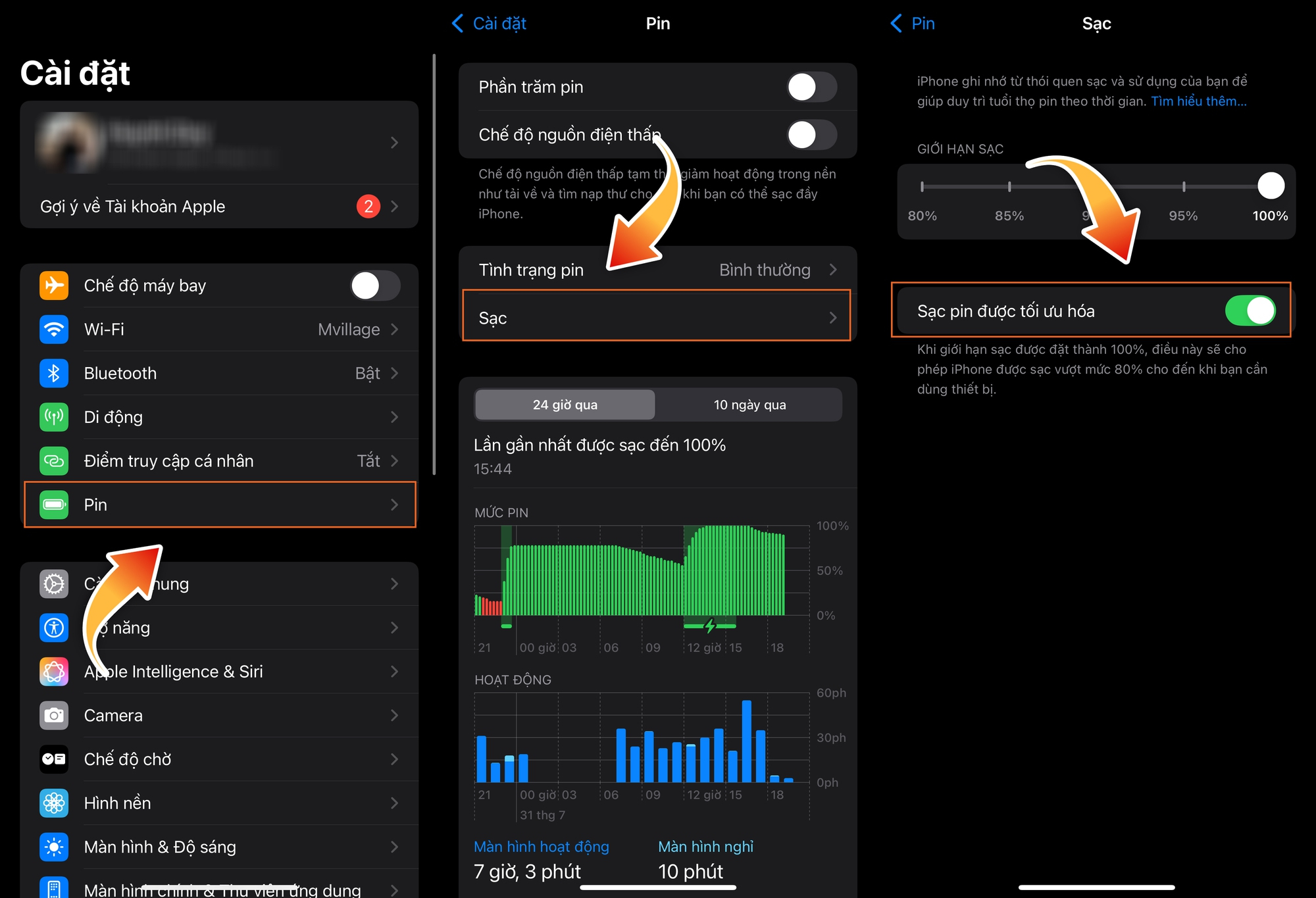
Morgan suggests enabling the “Optimized Battery Charging” feature on iPhones. This feature helps prolong battery life and reduces degradation caused by charging.

Additionally, Morgan advises users to turn off Bluetooth, reduce screen brightness, disable Siri, and limit background apps when not in use. While these adjustments may make iPhone usage slightly less convenient, they significantly save battery life.
According to the Daily Mail, after leaving Apple, Morgan frequently shares TikTok videos about Apple “secrets” rarely disclosed to users. One such tip is avoiding overnight charging.
This advice is supported by Ritesh Chugh, Associate Professor of Information and Communication Technology at CQUniversity (Australia). Tyler notes, “Most modern smartphones take only 30 minutes to 2 hours to fully charge. Overnight charging is not only unnecessary but also accelerates battery aging.”
Experts explain that lithium-ion batteries, used in most smartphones today, are affected by factors like temperature, charging habits, and usage frequency.
Finally, Morgan recommends allowing location access only when actively using apps, rather than keeping it enabled in the background. This enhances security and saves battery power effectively.

Go to “Settings” > select “Privacy” > then disable “Location Services” or allow apps to access your location only while in use.
How to Charge Your iPhone: Official Apple Guidelines

In today’s world, the iPhone has become an indispensable device in our daily lives. But do you know the proper way to charge your iPhone according to Apple’s guidelines to save time and optimize battery health?
IPhone Charging Warning: This Common Mistake Can Lead to Fires

Tech giant Apple has issued a warning over the bedtime habit of leaving your phone plugged in overnight.
The Risk of Losing an Additional $300 to $800: Apple Vision Pro for $3,499

The amount of money involved is related to fixing a “fallen from the sky” error.